
Two Honda keys can have the same number of buttons and still need different covers. Before you order a Honda key fob cover, take your key out of any case it’s already in and compare it with the listing in three views: front, back, and side. Check the shape first, then the button positions, then the openings for the key ring and emergency key. Use your vehicle model and year to narrow the search, not to make the final decision. If the listing doesn’t show a detail you need to verify, don’t assume it matches.
Start with the shape of the key you carry
Lay the fob flat with the buttons facing up. Compare the outline with the key shown in the listing, not just with the outer edge of the cover. Look at the corners, the width at each end, and whether the body tapers toward the key-ring loop. If the listing only shows the cover on its own, look for a separate fitment photo that shows the original key it was made for. A similar color or finish doesn’t tell you anything about fit.
Next, look at the side. A fob that looks flat from the front may have a raised edge or a thicker section on the back. Also check whether your key has a blade that flips out from the side, a removable emergency key, or a fixed exposed blade. Those designs need different clearances. A cover can match the front outline and still get in the way of a blade, latch, or hinge.
If you have two keys for the same car, compare the one that will actually wear the cover. A spare or replacement shell may look different from the original, even if both keys operate the vehicle.
Match the button layout, not just the button count
Count the buttons on your fob, then compare their order and position. Look for the lock and unlock buttons first, then identify any trunk, tailgate, panic, or remote-start button yours actually has. Check whether the buttons sit in a single column, side by side, or on a separate lower panel. If a listing combines multiple button counts in its title, verify which pictured layout goes with the option you’ll order.
For example, one Carsine Honda cover listing labeled 2 or 3 buttons mentions the CR-V in its title. A separate 5-button Honda/Acura listing also mentions the CR-V. That doesn’t mean both covers fit your particular CR-V key. It means the model name alone isn’t specific enough to choose between the listings. Start with the shape and layout of the fob in your hand.
How closely the buttons need to line up depends on the cover design. If the cover has molded button pads or printed symbols, match each pad or symbol to the correct button. If the cover leaves the button face open, check that the rim won’t overlap the outermost buttons. In either case, skip a cover that would make a button hard to reach.
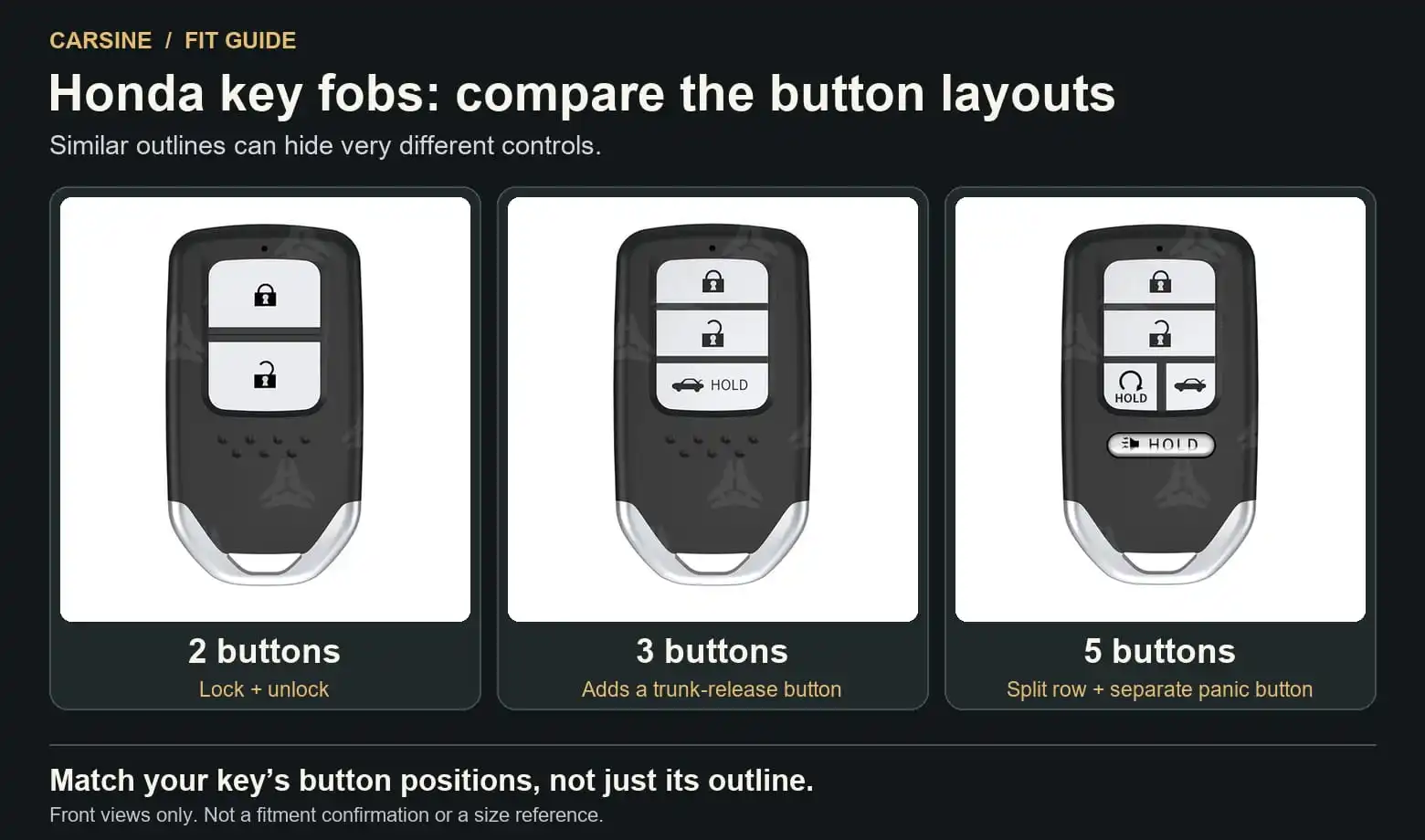
Take three photos and compare the details that matter
Take a straight-on front photo, turn the key over for a back photo, then take a side photo that shows the end with the key ring or blade opening. Use good light so you can distinguish a release slider from a seam. Hold both the fob and the listing photo in the same orientation; if the key ring points down in one image and up in the other, small differences are easy to miss. Keep your own pictures for comparison or support. There’s no need to include the vehicle’s VIN or a close-up of the key blade’s cuts.
| View | What to match | When to pause before ordering |
|---|---|---|
| Front | Outline, corners, button positions, and the edge of the button panel | The shape or button positions differ, even if the model name and button count match. |
| Back | Curve of the shell and any latch or slider used to release the emergency key | The cover appears to sit over the latch, or the listing doesn’t show whether you can reach it. |
| Side or end | Thickness, key-ring position, blade exit, and clearance around any hinge | The cover appears to block the opening, or the photos don’t show the relevant end. |
Some listing photos are angled to show the finish rather than the shape. If you can’t tell whether a critical feature lines up, use the clearer photos first. If the detail still isn’t visible, ask the seller to confirm the exact pictured option before you order.
Check the emergency key and key-ring openings
On a fob with a removable emergency key, look for both the release control and the path the key takes when it slides out. These are two separate checks: a cutout can leave the release accessible while the cover still overlaps the exit slot. Likewise, a cover can leave the slot visible but make the release hard to move. Decide whether you need to be able to remove the emergency key with the cover on, and confirm that the cover design lets you do that before buying.
If you carry a fob with a flip-out blade, check that the cover leaves room for the blade to swing and gives you access to the release button. Don’t force a blade or latch around a cover that crowds it. If your key has no removable or folding blade, focus on the openings your actual fob uses rather than shopping for a cutout it doesn’t need.
Finally, look at how you attach your key ring. If you want to keep using the fob’s own loop, check that the loop will still be exposed and that there’s room for the ring to pass through. If the cover uses its own attachment point, check how it fastens rather than assuming it works the same way as the original loop.
When a cover is the right fix—and when it isn’t
A cover fits over the shell you already have. It’s a reasonable option when the fob works and you want to protect its surface from everyday scuffs. It won’t fix an unreliable button, repair a loose blade, or replace a missing or damaged housing. If the original shell is split or won’t stay closed, identify whether the shell itself needs replacement before shopping for a cover. If the remote doesn’t work, troubleshoot that separately rather than treating a snug cover as a repair.
Once you’ve chosen a cover and put it on, check the fit before adding the key back to your everyday ring. In a safe place near the car, verify that lock and unlock respond normally and that no cover edge holds a button down. If you chose a cover that should leave the emergency key accessible, check that the release and exit still work without forcing anything. If something behaves differently with the cover installed, remove it and recheck the bare fob before drawing a conclusion about the key or the vehicle.
When the shape, controls, and openings line up, then choose the finish you prefer. Browse Carsine’s Honda key fob covers and compare the photos for your exact option before adding it to your cart.